Faculty Evaluation Header Sheets
Each submittal to ITS should include its own memo stating the department contact's name, phone number, evaluation semester/session and year. You must also include a list of any classes that have hand bubbled header forms rather than pre-printed (see Memo Details for more information). For example, we cannot process Summer Sessions I & II in the same run, so they need to be completely separated. Also, please assure that the header sheets placed in the packets are orientated correctly with the header sheet on top. These packets should only contain the header form and jade response sheets; no other papers or memos should be included within the packet. You may be asked to come down to the Computer Center to correct these problems if you have a large number of packets in your run. If you have any questions or if something is unclear, please call ahead of time.
Prior to having the students do the evaluations you must have the evaluation forms duplicated. The ITS Jade General Purpose Questionnaire must be used for this. In having your forms duplicated (typically by Creative Communications) you must assure that all of your forms are duplicated the same. If you send us packets that include different forms (answers to the same question on different lines, or differing questions on each sheet) the statistical results will not come out correctly, consequently invalidating all results. It is your responsibility to assure that the forms are all duplicated consistently.
The process will basically follow this procedure:
- Prepare individual packets for each class. On the outside of the packet you should record the course sequence number, department name and class number, professor's name and the total number of students enrolled. Each packet must have a different course sequence number/instructor ID pair.
- Pass the packets out for evaluation by the students.
- Collect the packets.
- Check the pre-printed header sheets supplied by ITS (Blue Faculty Evaluation Header Forms). Make sure each class has the correct professor listed. If the professor’s name is incorrect please fill in a new blank header sheet by hand correcting the problem. Also be sure to correct the field labeled “Internal Use Only” found in the lower right hand corner. This field needs to contain the course professor's NAU employee ID number (not Social Security Number). This nine-digit number can be obtained from payroll if unknown. Many times payroll lists a 7 or 8 digit number for the employee ID number. If this is the case then one or two zeros should be added to the beginning of the acquired number to insure that it is nine digits long. (e.g. 1234567 should now be 001234567)
- Hand bubble header sheets for classes/instructors that do not have a preprinted header sheet, or that do not have a correct preprinted header sheet.
- Fill in the form count field with the number of jade sheets included within the packet.
- Align the header sheet with the filled out jade forms and place them in the packet. The header sheet must be devoid of stray marks and you must strip off the perforated strip on either side of the form. The forms cannot be scanned with the perforated strips attached.
- Take the box(s) of evaluations to ITS for processing. Make sure to include a memo stating the department contact's name, phone number, and semester/session and year. You must also include a list of the all the courses that had forms bubbled in by hand. You need not include a course where the header form was physically damaged and simply replaced. The boxes are to be taken to the ITS Front Desk for check-in. A separate memo must be supplied for each semester/session that you are bring in packets for. These separate semester/sessions should be physically separated from other requests. Do not include multiple requests in the same memo. All new requests for changes to your forms and to the statistical output must be made a semester in advance, and a formal meeting between your department and ITS must be scheduled to review these changes (see below).
- Make sure that a separate tracking form is filled out for each semester/session at ITS. Your memo(s) should be placed directly behind the tracking form in the box.
In order to get ready for preparing your packets, you must have your
questions duplicated onto the jade evaluation forms. These forms
are available through Creative Communications. Creative Communications
also has non-copy blue forms that are exact copies of the JADE evaluation
form. You may obtain copies of these non-copy forms to prepare your
questions. Once you have obtained your jade evaluation forms from
Creative Communications, you may prepare your packets.
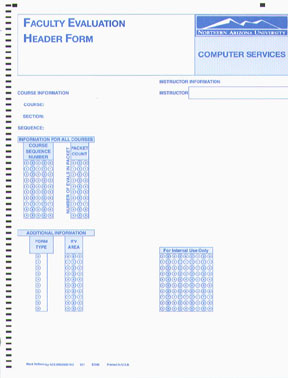
The header sheet is depicted in Figure 1.
The header sheets will come pre-printed with the following information:
- Course Information
- Course
- Section
- Sequence
- Instructor Information
- Instructors name
- Employee ID number
- The "Internal Use Only" field needs to contain the course professor's NAU employee ID number (not Social Security Number). This nine-digit number can be obtained from payroll if unknown. Many times payroll lists a 7 or 8 digit number for the employee ID number. If this is the case then one or two zeros should be added to the beginning of the acquired number to insure that it is nine digits long. (so 1234567 should now be 001234567)
- Match the pre-printed header sheet to the appropriate packet.
- Double check the course sequence number to assure the header is for the packet.
- Check the Instructor name. If the instructor's name is incorrect please bubble in a new blank header sheet by hand correcting the problem. Also be sure to correct the field labeled “Internal Use Only” found in the lower right hand corner. Again, this field needs to contain the course professor's NAU employee ID number (not Social Security Number). This nine-digit number can be obtained from payroll if unknown. Many times payroll lists a 7 or 8 digit number for the employee ID number. If this is the case then one or two zeros should be added to the beginning of the acquired number to insure that it is nine digits long. (so 1234567 should now be 001234567)
- Bubble the packet count into the PACKET COUNT field. The field is right justified. This means that if you have 3 student evaluations in a packet the field would be bubbled 003. Please bubble in the preceding zeros.
In the event that your set of pre-printed header sheets does not include a listing for one or more of your classes, it will be necessary for you to completely bubble and fill in a blank header sheet using the following steps:
- Write in the entries for the COURSE INFORMATION section.
- Course (e.g., EGR 255)
- Course Section
- Course Sequence Number
- Write in the instructors last and first name.
- Bubble in the instructors 9-digit employee ID number into the field labeled “For internal use only”
- Bubble in the course sequence number.
- Bubble in the packet count
Starting Spring 2003 the course sequence number is a 4 digit number. To bubble in this number you must prefix it with a zero. For example, if the course number is 1234 it would be bubbled as 01234.
Handling Multiple Instructors in a Course
Special procedures must be followed for classes with multiple instructors. Up to three pre-printed header forms will be printed for instructors for the class . For each additional instructor, it will be necessary to fill out a header sheet. It will also be necessary for you to provide ITS with a list of these courses and instructors. This list should be included in your faculty evaluation memo. The typed list must include: course sequence number, name, section, and secondary instructor name, and secondary instructor’s employee ID number. For example:12345 CIS120 001 Doe, John 001234567
Once you have the list typed up, prepare a header sheet for each instructor.
Please fill in all the appropriate fields for your department.
Preparing your Packets
- Cull out any blank forms and align all of the forms so that the cut corner is in the same alignment.
- Check the pre-printed header form. Count the number of student evaluations in the packet and bubble this number (right justified) in the appropriate spot on the header sheet. Fill in proceeding bubbles with zeros to insure proper scanning
- Bubble in any other appropriate sections.
- Stack your faculty evaluations in front of you with the questions facing up. Place the header sheet on top.
- Ensure that only jade response sheets and one blue header sheet is included in the packet. No other forms of ANY kind should be included. If written comments were taken these should be set aside and NOT included in the packet or sent to ITS.
- Double check to be sure that there are no stapled pages, sticky notes or paperclips attached to any forms. This can cause physical harm to the scanning machine.
- Slide the forms into the packet.
Processing
We can scan about 600 sheets in 1 hour. This includes the set-up time, pulling the forms from the envelopes, verifying the header sheet is enclosed and in front of the packet, quick check for yellow sticky's, staples, paper clips, etc, scanning, writing down the beginning and ending count on the envelope, re-stuffing the forms into the envelope, then performing the same functions on the next envelope, etc, etc. At the end we run a conversion step to make sure the data is ready for processing. The data files are then turned over to Academic Computing for reports creation.
The number given above is what we can realistically scan providing there
are no other problems. Items that cause major delays in the scanning are
forms turned in different directions in the envelope, staples in the forms,
yellow sticky's on the form somewhere. Any of these items, especially staples
and paper clips will slow us down, and also cause damage to the machine.
Paper clips and staples will scratch the read head, and also damage the
rubber rollers. Forms wrinkled, or damaged from coffee, soda or water can
also jam in the machine and delay the scanning process significantly.
Memo Details
Remember each semester or section is required to be submitted to ITS separately. Likewise if your department uses two different evaluation forms you will need to submit these completely separately as well (when submitting evaluations to ITS make sure that a separate tracking form is created to go along with each memo). For example StateWide uses two different forms. Each of these is required to be submitted separately even though they were both from the same semester. Each of these submissions is also required to have it's own memo. Please remember to include a blank copy of your evaluation form with the memo.What should be included in each memo:
- Department contact's name
- Department contact's phone number
- Semester, session and year of evaluations
- Request for raw data in electronic format (if you should require it)
If a semester or session includes header sheets that were hand-bubbled
rather than pre-printed you will need to also include the following for
each hand-bubbled header form:
- Course Sequence Number. The list must be in course sequence number order.
- Course prefix, number and section (example: CSE120 02)
- Instructors full name, First Middle Last (This would be the person who taught the class, not necessarily the person who was scheduled to teach the class)
- Instructors Employee ID Number (NOT Social Security Number, employee ID can be obtained from payroll)
Other Information
If you use multiple types of forms in your department (i.e. Fine Arts, Statewide programs, etc) it is imperative that you separate the forms and packets into separate boxes. The forms cannot be mixed in packets and the different packets cannot be mixed together. A separate memo must be written for each box of different form/packet types. You only need to include one copy of your evaluation form(s) no matter how many memos you are required to supply.
Even if all forms are pre-printed and correct, you must supply a memo with your packets. This memo is used in one part of the tracking process.
If you require separate processing of some of your packets, you must
supply a memo for each set of packets and make sure that the Front Desk
personnel at ITS fills out a separate tracking form for each set that will
be processed.
If you have a class that does not have any filled out jade evaluation
forms (student responses) you should remove the packet from the box prior
to delivery to ITS. You must not send the packet to us with only the header
form in it. We must have at least one evaluation form with a header or
it will cause problems in the scanning process. To reiterate... Do not
send packets that only include a header form and no evaluation forms.
If your department submits course evaluations after a batch has already
been processed, statistical analysis will be separate for this new batch
job. In other words, the entire department's statistics will NOT be reprocessed
to accommodate late course submissions. Each batch will have a self-contained
set of statistics generated and printed. It is best to verify that all
courses have been received before submitting evaluations to ITS for processing.
If you have any questions at all, please call Bill at x3-6461.